Check the rules first
Students now use AI tools in very different ways, and schools respond in very different ways. Some courses ban them, some allow them for brainstorming, and some allow drafts as long as you disclose it. This guide is for the middle case: you are permitted to use an AI draft, and you want to turn it into an essay that is accurate, argued well and truly yours. If your course does not allow AI, the right move is not to use it, and no editing changes that.
Step 1: read the policy first. Check your syllabus or assignment sheet for what is allowed and how to disclose it. If it is unclear, ask your instructor, in writing if you can. A two-line email now is far cheaper than an academic integrity meeting later. Everything below assumes your instructor has said AI assistance is fine.
Make it accurate
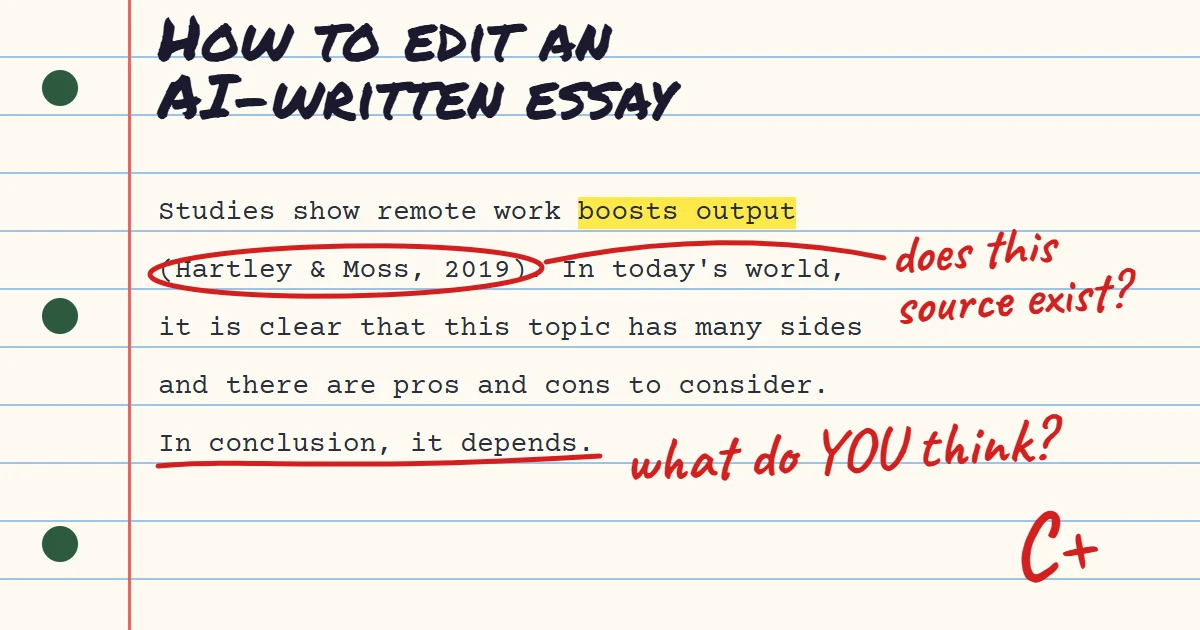
Step 2: verify every source. This is the most important edit. AI tools sometimes produce citations that look completely real, with plausible authors, titles and journals, but do not exist or do not say what the draft claims. Look up each reference yourself. If you cannot find it, remove it. If you can, open it and confirm the claim before you keep the sentence that cites it.
Step 3: check every fact and number. Dates, statistics, names and quotations all need to be confirmed against a source you have read. A model states a wrong fact in the same calm tone as a right one, so a smooth paragraph proves nothing. Mark each factual claim as you go and tick it off only when you have confirmed it.
Make it yours
Step 4: find the argument. AI drafts tend to survey a topic rather than take a position. Underline your thesis, then ask whether each paragraph supports it. If the essay reads like a balanced summary, decide what you actually think and rewrite the thesis and topic sentences to say it. Your instructor is grading your reasoning, and that has to come from you.
Step 5: add your own material. Bring in a reading from your course, a point from a lecture, an example from your own experience. Specifics tied to your class are the clearest sign the essay is yours, and they are also what the generic draft is missing. One strong paragraph that only you could have written beats three polished general ones.
Step 6: fix the voice. Cut the stock openers ("In today's world", "It is important to note"), trim connectors like "Furthermore" and vary your sentence lengths. A humanizer can do a first pass on this, and you should then read the result sentence by sentence, since a rewrite can occasionally shift the meaning of a precise academic claim.
A word on detectors
Step 7: cite and disclose. Cite sources the usual way. If your instructor asked for a note about AI use, write it plainly: which tool, what you used it for, and what you changed. Hiding the use is the part that gets students into trouble, not the use itself.
A final point about detectors. No AI detector is reliable enough to settle a question on its own, and they can wrongly flag human writing, especially from non-native English writers. Do not write to please a detector. Write an essay whose argument, sources and voice you can explain in person, because that is the real test if anyone asks.
Try the Free AI Humanizer
See the difference genuine humanizing makes — paste any AI text and get natural, human-sounding writing back.
Humanize My TextKeep reading
5 min read
How to Make AI-Written Emails Sound Natural (With Before and After Examples)
AI email drafts are polite to a fault. Here is how to cut the filler, shorten the openers and write emails people actually answer.
6 min read
Why Your AI Cover Letter Sounds Generic, and How to Fix It
Recruiters read hundreds of near-identical letters. Here is how to replace the stock lines in an AI draft with proof that you can do the job.